DYMO LabelManager 160 Labels – Compatible D1 Replacement Tape
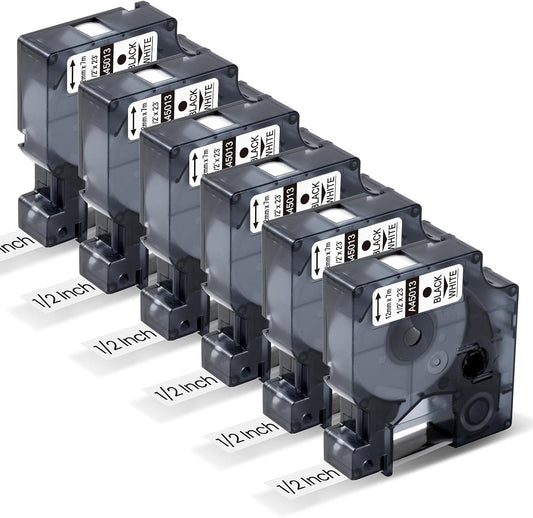
Looking for DYMO LabelManager 160 labels or replacement tape for your DYMO LM160? Colorty offers compatible D1 label tape designed for the DYMO LabelManager 160 handheld label maker. These replacement tapes are available in different widths and color combinations for everyday labeling at home, in the office, classroom, warehouse, or workshop.
The DYMO LabelManager 160, also known as the DYMO LM160 or DYMO LabelManager 160 handheld label maker, is a compact thermal label maker designed for quick, portable labeling. It uses DYMO D1 and compatible IND tapes up to 1/2 inch wide and supports 1/4-inch, 3/8-inch, and 1/2-inch label widths.
What Labels Does the DYMO LabelManager 160 Use?
The DYMO LabelManager 160 uses D1 label tape. If you are searching for labels for DYMO LabelManager 160, DYMO LabelManager 160 tape, DYMO LM160 labels, DYMO LM160 tape, or DYMO 160 replacement tape, D1-compatible tape is the key specification to check.
| Label Maker |
Compatible Tape |
Supported Widths |
| DYMO LabelManager 160 |
D1 / compatible D1 tape |
1/4", 3/8", 1/2" |
| DYMO LM160 |
D1 / compatible D1 tape |
1/4", 3/8", 1/2" |
These three widths correspond to approximately 6mm, 9mm, and 12mm. The LabelManager 160 supports labels up to 1/2 inch wide.
DYMO LabelManager 160 Tape Sizes
Choosing the right width makes it easier to create labels that fit the item you are organizing.
-
1/4 inch (6mm) D1 tape: A narrow option for small items, cables, folders, containers, and compact identification labels.
-
3/8 inch (9mm) D1 tape: A versatile size for everyday office, home, school, and storage labeling.
-
1/2 inch (12mm) D1 tape: The widest tape supported by the LabelManager 160 and useful when you need larger or more visible text.
Before ordering replacement tape, check the width of the cassette currently installed in your LabelManager 160. The machine accepts multiple D1 widths, so selecting the correct size is important.
Why Choose Compatible D1 Tape for DYMO LM160?
If you already own a DYMO LabelManager 160, you do not need to replace the label maker when the tape runs out. A compatible D1 replacement cassette allows you to continue using the same handheld label maker for everyday organization.
Colorty's compatible tapes are designed as replacement options for compatible DYMO label makers. They are not manufactured by or affiliated with DYMO and are intended to provide an alternative to original DYMO-branded consumables.
DYMO D1 tapes are available in a wide range of background and text colors. PtouchDirect's LabelManager 160 page also lists D1 tape options in multiple widths and color combinations.
DYMO LabelManager 160 Features
The DYMO LabelManager 160 is designed around quick, simple label creation rather than computer-based printing. Its portable design and physical keyboard make it useful when you need to create a label directly where the item is located.
-
QWERTY keyboard: The computer-style keyboard makes text entry familiar and straightforward.
-
One-touch formatting keys: Quickly access common formatting options without navigating through complicated menus.
-
Six font sizes: Choose different text sizes depending on the available label space.
-
Eight text styles: Create labels with different formatting styles.
-
228 symbols and clip-art options: Add symbols and graphics to labels for identification and organization.
-
Thermal transfer printing: Prints without ink or toner, so there is no ink cartridge to replace.
-
Portable design: The handheld format makes it convenient for labeling different rooms, work areas, storage locations, and equipment.
-
Automatic shutoff: The machine automatically turns off after a period of inactivity to help conserve battery power.
Staples lists the LabelManager 160 with 180 dpi resolution, a maximum print speed of 0.47 inches per second, and a six-AAA-battery power option.
What Can You Label with a DYMO LabelManager 160?
The compact design of the DYMO LM160 makes it suitable for a wide range of everyday labeling tasks.
- File folders and office documents
- Storage boxes and containers
- Kitchen jars and pantry containers
- School and classroom supplies
- Cables and electronic accessories
- Desk drawers and office supplies
- Garage and workshop storage
- Craft supplies and project materials
- Inventory and small business organization
- Packages, bins, and shelves
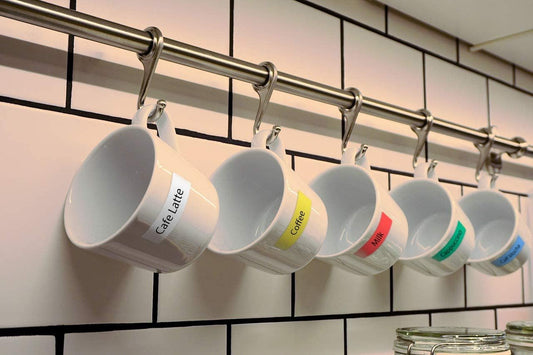
Because D1 tape is available in multiple widths and colors, you can use different tape combinations to create simple visual categories for home, office, school, or business organization.
DYMO LabelManager 160 vs. Other DYMO Label Makers
The LabelManager 160 is a straightforward handheld label maker focused on portable, keyboard-based labeling. Unlike computer-connected label printers, the LM160 does not require a PC to create labels. It is designed for users who want to type, format, and print labels directly from the machine.
| Feature |
DYMO LabelManager 160 |
| Design |
Portable handheld label maker |
| Keyboard |
QWERTY |
| Tape type |
D1 / compatible D1 tape |
| Tape widths |
1/4", 3/8", 1/2" |
| Maximum tape width |
1/2" (12.7mm) |
| Font sizes |
6 |
| Text styles |
8 |
| Symbols and clip art |
228 |
| Computer connection |
No |
| Printing technology |
Thermal transfer |
The specifications above are based on the LabelManager 160 product information currently listed by Staples.
How to Choose Replacement Labels for DYMO LM160
-
Confirm your label maker: Make sure your machine is a DYMO LabelManager 160 or LM160.
-
Choose D1 tape: The LabelManager 160 uses D1 label cassettes.
-
Select the width: Choose 1/4", 3/8", or 1/2" based on your labeling needs.
-
Choose the color combination: Select the text and background color that works best for your project.
-
Check the cassette: If you are replacing an existing cartridge, compare its width and tape type before ordering.
DYMO LabelManager 160 Labels FAQ
What labels does the DYMO LabelManager 160 use?
The DYMO LabelManager 160 uses D1 label cassettes. Compatible D1 tapes are available in 1/4-inch, 3/8-inch, and 1/2-inch widths.
What size tape does the DYMO LM160 use?
The DYMO LM160 supports D1 label tape in 1/4", 3/8", and 1/2" widths, approximately 6mm, 9mm, and 12mm. The maximum supported width is 1/2 inch (12.7mm).
Can I use D1 tape in the DYMO LabelManager 160?
Yes. D1 is the label cassette type used by the DYMO LabelManager 160. When purchasing replacement tape, make sure the cassette is the correct D1 type and width.
Are DYMO LabelManager 160 labels the same as LetraTag labels?
No. The LabelManager 160 uses D1 tape, while DYMO LetraTag label makers use a different tape system. Do not assume that a LetraTag cassette will work in a LabelManager 160.
Can I use 12mm tape in the DYMO LabelManager 160?
Yes. 12mm is approximately 1/2 inch and is the widest label tape size supported by the LabelManager 160.
Can I use 9mm tape in the DYMO LM160?
Yes. 9mm is approximately 3/8 inch and is one of the supported D1 tape widths for the LabelManager 160.
Can I use 6mm tape in the DYMO LabelManager 160?
Yes. 6mm is approximately 1/4 inch and corresponds to one of the supported D1 tape widths for the LabelManager 160.
Does the DYMO LabelManager 160 connect to a computer?
No. The LabelManager 160 is designed as a standalone handheld label maker and does not require a computer connection. Staples lists PC compatibility as not supported.
Does the DYMO LM160 use ink?
No. The LabelManager 160 uses thermal transfer printing, so it does not require ink or toner cartridges.
How many lines can the DYMO LabelManager 160 print?
The LabelManager 160 can print up to two lines on a label according to the product specifications listed by Staples.
What batteries does the DYMO LabelManager 160 use?
The LabelManager 160 uses six AAA batteries. An optional external power adapter can also be used with the label maker.
Are Colorty DYMO LM160 tapes genuine DYMO products?
No. Colorty tapes are compatible replacement products and are not manufactured by or affiliated with DYMO. They are designed for use with compatible DYMO label makers.
Shop Compatible DYMO LabelManager 160 Labels
Find compatible D1 replacement tape for DYMO LabelManager 160 and DYMO LM160. Choose the right tape width and color combination for organizing files, storage, cables, office supplies, school materials, equipment, and everyday items.
If you are searching for DYMO LabelManager 160 labels, DYMO LM160 tape, D1 tape for LabelManager 160, or replacement labels for DYMO 160, check the available compatible D1 options above to find the right replacement cassette for your label maker.